

A desktop vaporizer is a stationary, plug-in device that heats ground dry herb (or, on some models, concentrates) using mains power from a wall outlet, and it is worth the investment if you mostly vape at home, want larger chamber loads and longer sessions, and can accept a larger footprint and an upfront price that runs from about $150 for entry-level whip units up to $699 for premium dual-delivery units like the Volcano Hybrid [1] [2].
If you vape on the go, take short sessions outside the house, or want the cheapest possible entry into dry herb vaping, a modern portable will serve you better and cost less, because desktops trade mobility for the larger heating element, longer air path, and mains-powered thermal stability that give them their real advantages [4].
This guide walks through what a desktop is, how whip and balloon delivery differ, how convection, conduction, and hybrid heating shape the session, the price tiers to expect, the buyer profiles a desktop fits, what to look for when choosing one, and how to keep it clean.
What Is a Desktop Vaporizer and How Is It Different From a Portable?
A desktop vaporizer is a stationary electronic device that plugs into a wall outlet and heats ground dry herb (or, on some models, concentrates) to a controlled temperature that releases compounds as vapor without burning the material [1] [2]. Because it pulls power directly from the mains instead of from a rechargeable battery, the heating element can be larger and more thermally stable than what fits inside a handheld unit, and the parts that carry and cool the vapor can be bigger too [4].
A portable vaporizer is built around a rechargeable lithium-ion battery, a smaller chamber, and a short air path, so the whole device can fit in a pocket or a small pouch. That portability is the entire reason a portable exists, but it is also why a portable makes different trade-offs around heat-up time, chamber size, and cleaning access.
In practical terms, a desktop is meant to live on a shelf or a desk where you have a wall outlet and a little room around it, and you bring the whip or balloon to your mouth instead of bringing the device to where you are going. That single difference in setup is what shapes everything else: power source, heating method, chamber size, delivery style, and how easy the unit is to clean [1].
If you already use a portable and are wondering whether a desktop is an upgrade or a sidestep, the cleanest way to think about it is that a desktop is a different tool with a different job, not a strictly better version of the same tool. Our guide on How Do You Choose the Right Portable Vaporizer? walks through the portable side of that comparison in detail.
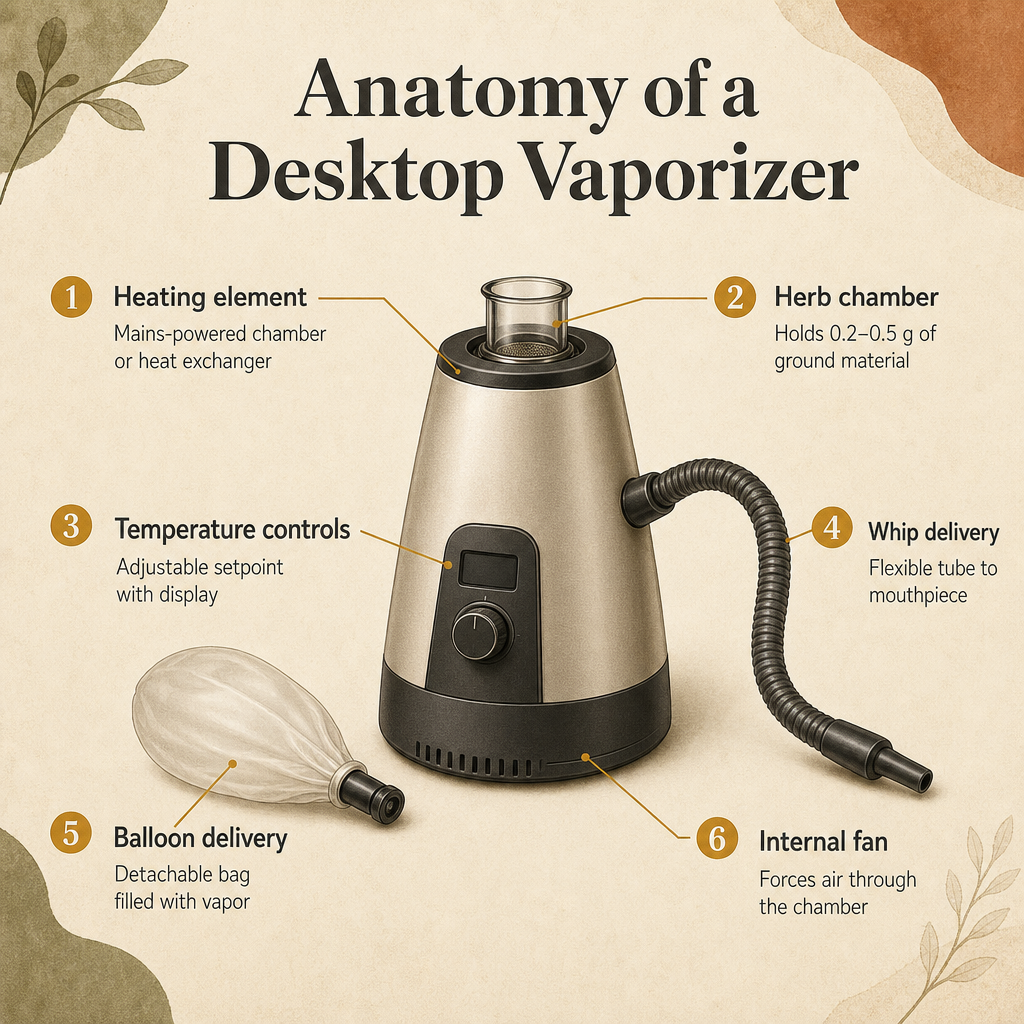
- Heating element: a desktop uses a mains-powered heating chamber or heat exchanger that is larger and more thermally stable than the battery-powered element in a portable [1] [2].
- Herb chamber: a desktop chamber typically holds 0.2 to 0.5 grams of ground material, larger than the 0.1 to 0.3 grams common in most portables [4].
- Power source: a desktop plugs into a wall outlet for continuous power with no battery degradation or mid-session power loss, while a portable runs on a rechargeable battery that needs to be charged between sessions [4].
- Delivery style: a desktop usually delivers vapor through a whip (a flexible tube) or a balloon (a detachable bag), while a portable delivers vapor directly through its own mouthpiece.
- Footprint and use case: a desktop is meant to stay on a surface near an outlet and serve longer at-home sessions, while a portable is meant to travel with you and serve shorter on-the-go sessions.
| Feature | Desktop vaporizer | Portable vaporizer |
|---|---|---|
| Power source | Wall outlet (mains power, continuous) | Rechargeable lithium-ion battery |
| Chamber size | 0.2 to 0.5 g typical | 0.1 to 0.3 g typical |
| Heat-up time | Roughly 60 to 180 seconds | Roughly 15 to 60 seconds |
| Delivery style | Whip tube and/or balloon bag | Direct mouthpiece draw |
| Cleaning access | Larger, more accessible parts | Tight internals, smaller parts |
How Do Whip and Balloon Delivery Work on a Desktop Vaporizer?
Desktop vaporizers generally deliver vapor one of two ways: through a whip or through a balloon [3]. A whip is a flexible tube that runs from the heating chamber to a mouthpiece, so the user draws vapor directly from the device through the tube. A balloon is a detachable bag that the unit fills with vapor, after which the bag is removed and the user sips from it at their own pace.
Different desktop units support different delivery styles. Whip-only units like the Arizer V-Tower deliver vapor only through a tube; balloon-only units like the Volcano Classic fill bags but do not include a whip; and dual-function units like the Storz & Bickel Volcano Hybrid and the Arizer XQ2 (also known as the Extreme Q) include both options out of the box [2] [3] [7].
Practical differences come down to session style. Whip delivery tends to feel direct, since vapor travels a short path from the chamber to the user, and it suits solo or small-group sessions where everyone is sitting near the device. Balloon delivery detaches the user from the device entirely, so a single balloon can be passed around a room, and balloon vapor tends to cool slightly inside the bag before it is inhaled [3].
If you want a side-by-side look at how those two delivery styles fit into a broader portable-versus-desktop decision, our Portable vs Desktop Vaporizer: Which Fits Your Routine? walks through the routine-level trade-offs.
- Whip delivery: a flexible tube runs from the chamber to a mouthpiece, and the user draws vapor directly when they inhale, which suits solo or small-group sessions near the device [3].
- Balloon delivery: the device fills a detachable bag with vapor, and the user removes the bag and sips from it at their own pace, which suits group sessions and lets vapor cool slightly before inhalation [3].
- Whip-only desktops: units like the Arizer V-Tower include a whip but not a balloon, which keeps the design simpler and the price lower.
- Balloon-only desktops: units like the Storz & Bickel Volcano Classic fill bags but do not include a whip, with a 130 degrees C to 230 degrees C range and roughly 20 x 18 x 20 cm footprint [7].
- Dual-function desktops: units like the Volcano Hybrid and the Arizer XQ2 / Extreme Q support both balloon and whip delivery, so the same unit can flex between solo whip sessions and shared balloon sessions [2] [3].
How Does a Desktop Vaporizer Heat Dry Herb — Convection, Conduction, or Hybrid?
Dry herb vaporizers heat material one of three ways, and the heating method is one of the biggest differences between desktop and portable units. Conduction vaporizers heat material by direct contact with a hot surface inside the chamber. Convection vaporizers heat material by passing hot air through the chamber, often with the help of an internal fan. Hybrid vaporizers combine both approaches in a single chamber or heat exchanger [5] [6].
Desktop vaporizers are dominated by convection and hybrid heating, while most portable vaporizers lean on conduction or hybrid. The reason is energy: convection requires moving heated air through the herb, which takes more sustained energy than conduction’s direct-surface contact, and that energy difference is much easier to deliver from a wall outlet than from a battery [5] [6].
A good concrete example of hybrid desktop engineering is the Storz & Bickel Volcano Hybrid, which combines convection and conduction in a patented Double Helix Heat Exchanger. The unit supports both balloon and tube delivery, reaches about 180 degrees C / 356 degrees F in roughly 40 seconds, runs an adjustable 40 degrees C to 230 degrees C (104 degrees F to 446 degrees F) range, and pulls up to about 30 liters per minute of airflow on tube mode [2]. You can see how that spec sheet differs from a typical portable by browsing the Storz & Bickel Volcano Hybrid Desktop Vaporizer product page.
In session terms, conduction tends to heat the portion of herb that touches the chamber walls first, convection tends to heat the load more evenly because hot air passes through it, and hybrid tries to combine both effects. The practical takeaway is that desktop convection and hybrid units generally feel more even across a chamber load, while portable conduction units are usually faster to first draw because they ramp up quickly from battery power.
- Conduction: a hot surface inside the chamber touches the herb directly to heat it, which ramps up quickly but can heat the load unevenly because only the herb touching the walls gets direct heat [5].
- Convection: hot air is drawn or forced through the herb chamber, which heats the load more evenly and is the dominant heating method in many desktop vaporizers [5] [6].
- Hybrid: a combination of convection and conduction in a single chamber or heat exchanger, used by desktop units like the Volcano Hybrid’s Double Helix Heat Exchanger and by many portable units as a compromise between speed and evenness [2] [6].
- Why desktops favor convection and hybrid: convection is more energy-intensive than conduction, and steady mains power delivers that energy more easily than a rechargeable battery does, which is why desktop units cluster around convection and hybrid heating while portables cluster around conduction and hybrid [5] [6].
What Are the Real Advantages of a Desktop Over a High-End Portable?
Desktops are not strictly better than portables; they are tuned for a different job. The advantages a desktop actually buys you are the ones that come from mains power, a larger heating element, and bigger, more accessible parts [1] [4]. The trade-offs are the ones that come from being stationary, taking up shelf space, and being heavier.
The clearest advantage is power consistency. A desktop pulls continuous current from a wall outlet, so there is no battery that fades mid-session, no low-battery throttling of the heating element, and no charging routine between sessions. That consistency lets the heating element stay closer to its target temperature across a long session, which is one of the practical reasons desktops feel stable even on extended group use [4].
The second advantage is part size. Desktop chambers hold roughly 0.2 to 0.5 grams of material, balloon systems can fill multiple bags from a single load, and the air path and mouthpieces are larger and easier to take apart. That makes loading, emptying, and cleaning noticeably easier than working inside a portable’s tight chamber with a small brush [4].
The trade-offs are the ones you would expect. A desktop is not portable, so it does not travel with you. Typical desktops heat up in 60 to 180 seconds, which is slower than the 15 to 60 seconds most modern portables take [4]. And the unit itself takes up real shelf or desk space, which matters in smaller living areas. If your routine is mostly at home and you can give the device a permanent spot, those trade-offs are usually worth it.
If you are weighing whether to add a desktop alongside a portable instead of replacing one, the portable you already use will keep covering the on-the-go side. A good all-around portable like the Focus V AERIS Kit handles the times a desktop simply cannot follow you.
- Mains power: a desktop runs on continuous wall-outlet power with no battery degradation, no mid-session power loss, and no charging between sessions, which keeps the heating element thermally stable [4].
- Larger heating element and chamber: a desktop’s heating chamber is bigger and more thermally stable than a portable’s, and chambers hold 0.2 to 0.5 g versus the 0.1 to 0.3 g common in most portables [4].
- Group-friendly delivery: balloon-based desktops can fill multiple bags from a single load, which suits group sessions of three or more in a way that a single portable mouthpiece cannot [4].
- Easier cleaning: the larger parts, removable chambers, and wider air paths on a desktop are easier to disassemble, brush, and rinse than the small internals of a portable [1] [4].
- Trade-off: no portability, a larger footprint, and a typical 60 to 180 second heat-up versus 15 to 60 seconds on most modern portables, so a desktop only wins when you are mostly at home [4].
How Much Does a Good Desktop Vaporizer Cost and What Tiers Exist?
The desktop vaporizer market runs from roughly $150 to $700, and the price tiers track fairly closely to what each tier actually delivers [8]. At the affordable end, entry-level whip-only units like the Arizer V-Tower give you direct whip delivery and basic temperature control without balloon functionality.
In the mid range, dual-function balloon-and-whip units like the Arizer XQ2 (also sold as the Extreme Q) add balloon delivery alongside the whip, which makes the unit flexible enough for both solo sessions and group sharing [3]. The Arizer Extreme Q sits at the value end of this tier at around $199.95 in current retail listings [8].
At the top of the range sit premium convection and hybrid units, anchored by the Storz & Bickel Volcano Hybrid. The Hybrid combines convection and conduction in a Double Helix Heat Exchanger, supports both balloon and tube delivery, hits roughly 180 degrees C in around 40 seconds, runs a 40 degrees C to 230 degrees C range, and lists at $699 on the manufacturer’s site [2]. Other specialist roundups list the Hybrid at slightly different prices around the same ballpark, with current listings around $594 [8].
What changes as you move up the tiers is mainly build quality, heating sophistication, and delivery flexibility, not the core job of heating dry herb. The Arizer ExtremeQ Desktop Vaporizer product page is a useful mid-tier reference if you want to see what a dual-function unit looks like in current retail before deciding where you land.
- Entry-level tier (around $150 and up): whip-only desktops like the Arizer V-Tower, which deliver vapor through a flexible tube at a basic temperature range and skip balloon functionality [8].
- Mid-range tier (roughly $200 to $300): dual-function balloon-and-whip units like the Arizer XQ2 / Extreme Q at around $199.95, which add balloon delivery and a remote control on some models [3] [8].
- Premium tier (roughly $500 to $700): convection and hybrid desktops anchored by the Storz & Bickel Volcano Hybrid at $699 list, with Double Helix Heat Exchanger heating, both balloon and tube delivery, and a roughly 40 second heat-up to 180 degrees C [2] [8].
Who Is a Desktop Vaporizer Best Suited For?
Desktops are not for everyone, and they work best for buyers whose routines line up with their strengths. The clearest fit is a buyer who mostly vapes at home and wants longer sessions, larger loads, and easier cleaning than a portable offers. Group buyers — anyone who regularly shares a session with two or more other adults — also get a lot of value out of balloon delivery, since a single balloon can be passed around while the device fills the next bag [4].
Heavy home users who run through material faster than occasional users also benefit. A 0.2 to 0.5 gram chamber and the ability to fill multiple balloons per pack means fewer reloads and longer stretches between teardown and cleaning [4]. Buyers who care about build quality, replaceable parts, and warranty support are a third natural fit, because premium desktops are explicitly engineered for longevity and parts availability [8].
The clearest mismatches are buyers who vape mostly outside the house, take short sessions on the go, or want the lowest possible upfront spend. For those routines a modern portable is the right tool. A buyer who wants one device for everything, including travel, will be frustrated by a desktop that cannot leave the house, and a buyer on a tight budget will get more value out of a portable than out of a stripped-down entry-level desktop.
If a desktop does sound like the right fit, our Desktop Vaporizers subcategory page collects the current lineup of desktop units available in the shop so you can compare what is actually in stock against what you just read about.
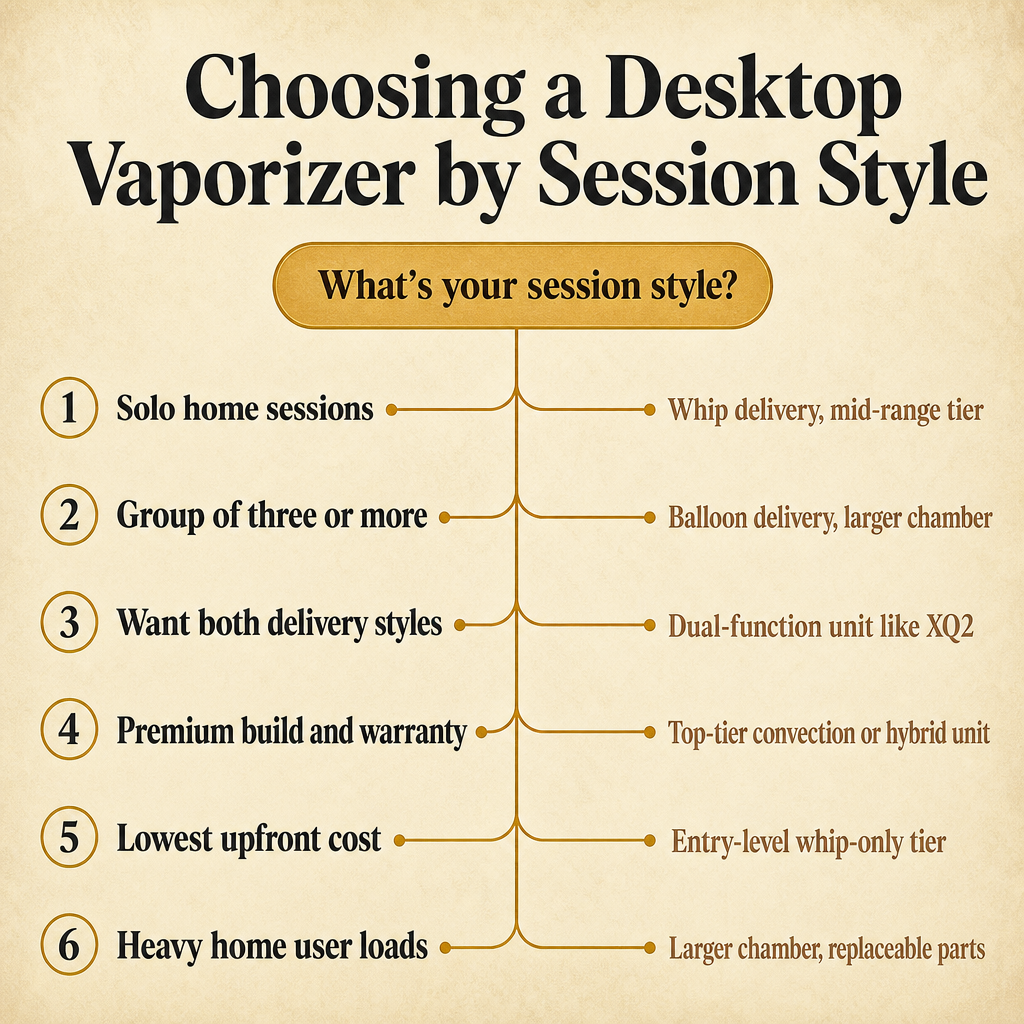
- Solo home user who wants longer sessions: a desktop’s mains power, larger chamber, and easier cleaning fit a routine built around one or two longer at-home sessions per day [4].
- Group of three or more adults: balloon delivery lets one device serve multiple users by passing filled bags around the room, which a portable mouthpiece cannot match [4].
- Heavy home user with frequent sessions: a 0.2 to 0.5 g chamber and the ability to fill multiple balloons per load means fewer reloads and shorter teardown between sessions [4].
- Buyer who values build quality and replaceable parts: premium desktops are engineered for longevity, and parts like whips, balloons, valves, and screens are sold separately by the manufacturer [8].
- Wrong fit: a buyer who vapes mostly outside the house, takes short on-the-go sessions, or wants the lowest upfront spend will get more value out of a modern portable than a desktop.
What Should You Look for When Choosing a Desktop Vaporizer?
Specialist recommendations for choosing a desktop come down to a short list of decision criteria that map directly to how you actually plan to use the device [3] [8]. Working through them in order keeps the decision grounded in your routine instead of in spec sheets.
Start with delivery style, because that choice rules out a lot of units. If you want to pass vapor around a room, balloon delivery is the deciding factor, and you should focus on balloon-capable units like the Volcano Hybrid or the Arizer XQ2. If you mostly vape solo and want the simplest setup, whip-only units like the Arizer V-Tower cover that case without paying for balloon hardware you will not use [3].
Next, decide between convection and hybrid. Convection units like the Volcano Classic and many mid-range desktops heat the load with hot air; hybrid units like the Volcano Hybrid add a conduction component in the chamber or heat exchanger for faster heat-up [2] [6]. There is no universally better answer, but convection tends to feel even across the load and hybrid tends to feel fast on first draw.
After that, look at temperature precision, chamber size, build quality, warranty, and replacement-part availability. These are the criteria that separate a premium desktop from a mid-range one in day-to-day use, and they are also the criteria that determine whether the unit will still be working two or three years from now [3] [8]. Our What Temperature Should You Set a Vaporizer To? walks through temperature setting in more detail if you want a closer look at that part of the decision.
- Delivery style: choose balloon, whip, or dual-function first, because that decision rules out whole categories of units and lines up with whether you mostly vape solo or share sessions [3].
- Heating method: pick convection for even heat across the load, hybrid for a faster first draw, or conduction if you specifically want a budget build, keeping in mind that desktops cluster around convection and hybrid while portables cluster around conduction and hybrid [6].
- Temperature precision: look for an adjustable setpoint with a clear display, and check the published range so it covers the temperatures you actually plan to use [1] [2].
- Chamber size: confirm the published chamber capacity, since 0.2 to 0.5 g is typical for desktops and balloon units can stretch one load across multiple bags [4].
- Build quality, warranty, and replacement parts: verify the manufacturer sells whips, balloons, valves, screens, and chamber inserts separately, because those parts wear out with regular use [3] [8].
How Do You Clean and Maintain a Desktop Vaporizer?
Routine maintenance on a desktop is easier than on a portable for the simple reason that the parts are larger and easier to reach [1] [4]. The exact steps depend on whether your unit uses a whip, a balloon, or both, but the broad routine is the same across all three styles.
Between sessions, brushing out the chamber and emptying spent material is the most important step, because residue left in a warm chamber is what builds up over time. Whip tubing and mouthpieces should be rinsed periodically and allowed to dry fully before reassembly. Balloons and valves are wear items: balloons stretch and need replacement, and valves can stick if residue builds up around the seal [4].
A monthly deeper clean — disassembling the air path, brushing the chamber thoroughly, soaking whip and mouthpiece parts, and replacing any balloon or valve that is showing wear — is usually enough to keep a desktop running consistently. The larger geometry is what makes this realistic to do at home, since on a portable the same routine is harder because the parts are smaller and harder to handle.
If you are also maintaining a portable alongside the desktop, our Portable Vaporizers subcategory page collects the portable lineup in case you want to compare cleaning routines across both styles.
- Between sessions: brush out the herb chamber and empty spent material so residue does not build up while the chamber is still warm [1].
- Weekly: rinse whip tubing and mouthpieces with warm water, and let every part dry fully before reassembling to avoid moisture in the air path [4].
- Monthly: do a deeper clean by disassembling the air path, brushing the chamber thoroughly, and soaking whip and mouthpiece parts to clear residue [4].
- Replace wear items: balloons, valves, screens, and chamber inserts are wear parts and are usually sold separately by the manufacturer, so verify replacement-part availability when you choose the unit [1] [8].
Frequently Asked Questions
How long does a desktop vaporizer take to heat up?
Can a desktop vaporizer handle concentrates as well as dry herb?
Some desktop units are designed for dry herb only, while others include a concentrate-compatible pad or chamber insert. Check the specific model’s accessories before assuming it will work with concentrates, and follow the manufacturer’s pad-loading instructions.
How much dry herb does a desktop vaporizer chamber hold?
Desktop chambers typically hold about 0.2 to 0.5 grams of ground material per load, larger than the 0.1 to 0.3 grams common in most portables, and balloon-based desktops can fill multiple bags from a single load for group sessions [4].
Do desktop vaporizers need replacement parts over time?
What is the main reason to choose a desktop over a high-end portable?
The main reasons are continuous mains power with no battery fade, a larger heating element and chamber, balloon-based group sharing, and easier cleaning on bigger parts. The trade-offs are no portability, a larger footprint, and a typical 60 to 180 second heat-up versus 15 to 60 seconds on most modern portables [1] [4].
So, Is a Desktop Vaporizer the Right Buy for You?
A desktop vaporizer is worth the investment if your routine is mostly at home, you want larger chamber loads and longer sessions than a portable comfortably offers, and you value the build quality, parts availability, and easier cleaning that come with mains-powered hardware [1] [2] [4].
If you mostly vape on the go, take short sessions outside the house, or want the lowest possible entry price, a modern portable will serve you better and cost less. For everyone in between, the honest answer is that a desktop is a different tool with a different job, and the right call depends on matching the unit’s delivery style, heating method, and price tier to your actual session habits [3] [8].
Sources
- HEMPER: What is a Desktop Vaporizer: Key Benefits
- Storz & Bickel: VOLCANO HYBRID Vaporizer | Buy The Original Device
- Arizer: Whip vs Balloon Vaporizer
- Azarius: Portable vs Desktop Vaporizers: Buyer’s Guide
- HEMPER: Convection vs Conduction Vapes: Which One is Better?
- Planet of the Vapes: Conduction vs Convection vs Hybrid: What’s the Difference?
- Storz & Bickel: VOLCANO CLASSIC Vaporizer
- Planet of the Vapes: Best Desktop Dry Herb Vaporizers [2026]
- The Kind Pen: Dry Herb Vaping vs. Smoking: Which Method is Better for You?